
Direct Summary: US, European, and Australian warehouses do not need to import camera hardware from Vietnam to run ASCAM ENTERPRISE. We recommend buying the Reolink RLC-811A — 4K 8MP PoE IP Camera with an f = 2.7mm – 13.5mm Motorized Varifocal Lens (5× Optical Zoom + Autofocus) locally on Amazon US (ASIN: B09873G7X3) or Reolink.com (~$109–$129). Its motorized optical zoom lets you mount the camera high above the packing bench while zooming tightly onto shipping labels for 0.2-second AI barcode scanning via standard RTSP (Port 554).
1. Need a Camera That Can Read Shipping Labels on Boxes & Packing Slips? Why the 2.7mm – 13.5mm Motorized Lens Is Key
Whether you are searching security integration forums (like IPVM) for a camera that can read shipping labels on boxes or setting up a 3PL fulfillment bench to record printed packing slips and pick tickets, the #1 mistake warehouse managers make is purchasing a fixed wide-angle lens (`2.8mm` or `4.0mm`). When mounted 1.5 to 2.5 meters (5 to 8 feet) above a packing table, a `2.8mm` lens captures the whole room, but a `4×6 inch` shipping label or packing slip occupies less than 3% of the frame — making 1D/2D tracking barcodes, 8pt SKU text on packing slips, and serial numbers impossible to read during a dispute.
The Reolink RLC-811A solves this hardware physics problem because it features a motorized varifocal optical zoom lens (`f = 2.7mm – 13.5mm`, `F1.6 – F3.3`) with automatic focus controlled directly from software:
Overhead Parcel Overview & Material Consumption
At the wide 2.7mm focal length (105° Horizontal × 55° Vertical FOV), mount the RLC-811A above the bench to record the entire tabletop, pick-tote unloading, bubble-wrap/dunnage consumption, digital scale readout, and box sealing.
Close-Up Shipping Label & AI Barcode Scanner
Zoom the motorized lens toward 13.5mm (31° Horizontal × 17° Vertical FOV). Even when mounted high overhead on a ceiling truss or tall arm (completely out of the packer's workspace), the 5× optical zoom + 4K 8MP sensor (3840 × 2160) renders shipping labels razor-sharp for 0.2s AI barcode detection!
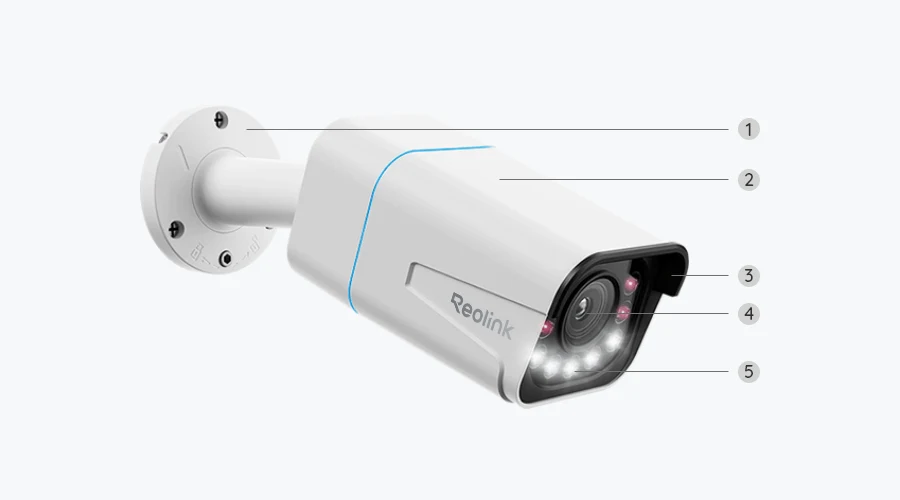
#4: 2.7mm–13.5mm Motorized Lens · #5: 5× 6500K Spotlights
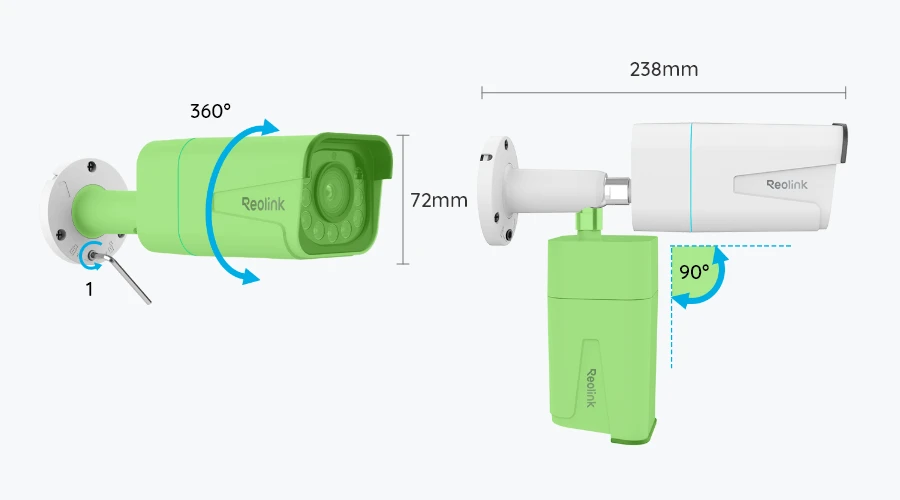
360° Swivel & 90° Vertical Tilt for Top-Down Bench Mounting
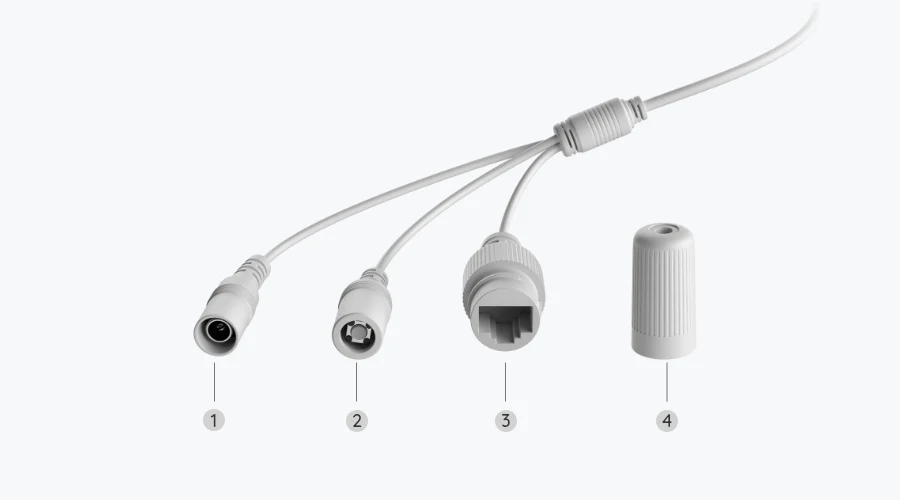
#1: 12V DC · #2: Reset Button · #3: IEEE 802.3af PoE RJ45 Port
2. Reolink RLC-811A Official Hardware Specifications
Reference specification sheet for IT and warehouse operations teams ordering the Reolink RLC-811A in the United States or internationally:
| Model Name / SKU | Reolink RLC-811A — Smart 4K Spotlight PoE Camera with 5× Optical Zoom |
|---|---|
| Lens & Optical Zoom | f = 2.7mm – 13.5mm Motorized Varifocal Lens (F=1.6–3.3, with IR cut, 5× Optical Zoom + Autofocus) |
| Field of View (FOV) | Horizontal: 105° (at 2.7mm) to 31° (at 13.5mm) · Vertical: 55° (at 2.7mm) to 17° (at 13.5mm) |
| Image Sensor & Resolution | 1/2.8" CMOS Sensor · Default 3840 × 2160 (8.0 Megapixels / 4K Ultra HD) @ 25fps |
| Video Bitrate & Codec | Mainstream: 4096 Kbps – 8192 Kbps (Default 6144 Kbps, H.265) · Substream: 64 – 512 Kbps (H.264) |
| Power over Ethernet (PoE) | IEEE 802.3af, 48V Active PoE (Single Cat5e/Cat6 RJ45 cable for power + data) or DC 12V⎓1A (<12W) |
| Built-In Bench Lighting | 5pcs / 4W / 6500K Daylight Spotlights (450 Lumens) — eliminates barcode glare & shadows |
| Network Protocols | RTSP (Port 554), ONVIF (Port 8000), RTMP, HTTP, HTTPS, TCP/IP, UDP, DHCP, Static IP, NTP |
| Dimensions & Housing | 80 × 72 × 238 mm · Weight: 838g · IP67 Weatherproof Aluminum Housing (ideal for dusty warehouses) |
3. Step-by-Step Configuration: Static IP → Enable RTSP → Test RTSP Connection
Once you plug your Reolink RLC-811A camera(s) into a standard IEEE 802.3af PoE Switch connected to the same Local Area Network (LAN) as your Windows PC running ASCAM ENTERPRISE, complete these four setup steps (takes ~5 minutes per camera):
Initialize Camera & Adjust the 2.7mm–13.5mm Motorized Zoom
- Download and open the official Reolink Client on your Windows PC (or open the camera's initial IP address in Chrome/Edge).
- Create an administrator password for the camera (Username:
admin). Important: Use alphanumeric characters only (e.g.Warehouse2026) — avoid special URL-reserved characters like@,#,/, or&so your RTSP URL parses cleanly without URL-encoding issues. - Open the PTZ / Optical Zoom control in Reolink Client and slide the Zoom bar (`2.7mm – 13.5mm`) until your shipping label scan tray (or packing table) fills the frame, allowing the motorized autofocus to lock in razor-sharp barcode clarity.
Set a Static Local IP Address on the Reolink RLC-811A
Never leave warehouse cameras on DHCP. If the warehouse router restarts, DHCP can assign a new IP address and disconnect your packing station. Here is how to lock a Static IP:
- In Reolink Client (or Web Browser UI), click the Gear Icon (Device Settings) next to the camera.
- Navigate to Network → Network Information → Network Status and click Set Up.
- Change Connection Type from
DHCPtoStatic. - Enter your planned static IP scheme for each station:
- • Station 1 Overview Cam: IP
192.168.1.101· Station 1 Waybill Cam: IP192.168.1.102 - • Subnet Mask:
255.255.255.0 - • Default Gateway: Your router IP (typically
192.168.1.1) - • Preferred DNS:
8.8.8.8/1.1.1.1
- • Station 1 Overview Cam: IP
- Click Save. The camera will reconnect at its permanent Static IP within 5 seconds.
Enable RTSP Server (Port 554) & ONVIF in Network Advanced Settings
On newer Reolink firmware, RTSP and ONVIF ports are disabled by default. If you skip this step, RTSP connections will return Connection Refused. Enable them as follows:
- In Reolink Client / Web UI, go to Settings (Gear Icon) → Network → Advanced.
- Next to Server Settings (or Port Settings), click Set Up.
- Toggle RTSP to ON (Default Port:
554). - Toggle ONVIF to ON (Default Port:
8000). - Ensure HTTP (Port 80) / HTTPS (Port 443) and RTMP (Port 1935) are enabled, then click Save.
Test the RTSP Stream in VLC & Add to ASCAM ENTERPRISE
Before adding the camera to ASCAM, verify that your Windows PC can pull the live video stream over LAN using VLC Media Player:
- Open VLC Media Player → press
Ctrl + N(or click Media → Open Network Stream). - Paste one of the official Reolink RLC-811A RTSP URLs below (replace
PASSWORDand192.168.1.101with your camera's password and Static IP):
Once the live video appears in VLC, open ASCAM ENTERPRISE → Camera Settings, paste the exact same RTSP URL into your Packing Station (Camera 1 Overview or Camera 2 Waybill), draw your green AI Barcode Scan Zone (ROI) over the shipping label tray, and start recording!
Frequently Asked Questions
Why is the Reolink RLC-811A (2.7mm–13.5mm Motorized Lens) the best camera that can read shipping labels on boxes and packing slips?
The Reolink RLC-811A combines a 4K 8MP sensor (3840 × 2160 @ 25fps) with an f=2.7mm–13.5mm Motorized Varifocal Lens (5X Optical Zoom + Autofocus) and IEEE 802.3af PoE. At 2.7mm (105° wide FOV), it captures the entire packing table overview; zoomed optically to 10mm–13.5mm (31° telephoto FOV), it can be mounted 1.5m–2.5m overhead out of the packer’s way while reading tiny 1D/2D barcodes, 4×6 inch shipping labels on boxes, and printed packing slips in 0.2 seconds.
Why must I set a Static IP address on my Reolink packing cameras?
If a camera is left on DHCP, a warehouse power outage or router reboot can assign a new IP address (e.g., changing 192.168.1.101 to 192.168.1.115), breaking the RTSP stream link in your packing software. Setting a Static IP permanently locks each camera to its assigned packing station.
What is the exact RTSP URL format for the Reolink RLC-811A?
After enabling RTSP (Port 554) in Reolink Network Advanced Port Settings, use rtsp://admin:PASSWORD@CAMERA_IP:554/h264Preview_01_main (H.264 Main Stream), rtsp://admin:PASSWORD@CAMERA_IP:554/h265Preview_01_main (4K H.265 Main Stream), or rtsp://admin:PASSWORD@CAMERA_IP:554/h264Preview_01_sub (Sub Stream).
How much does the ASCAM software license cost to use with Reolink PoE IP cameras?
ASCAM ENTERPRISE offers an all-inclusive software license at $199/year, which includes 2 packing stations (supporting 2 overview cameras + 2 waybill scanning cameras + 2 close-up cameras — 6 cameras total). From the 3rd packing station onwards, each additional station is +$69/year. Every license works with any IP camera supporting the RTSP protocol (Reolink, Hikvision, Dahua, Imou, Axis, Amcrest, ...) with built-in Shopify integration, custom WMS/OMS deployments, unlimited videos, unlimited duration, and unlimited local retention.
Ready to Pair Your Reolink RLC-811A with ASCAM ENTERPRISE?
Get our all-inclusive software license at $199/year (includes 2 packing stations: 2 overview + 2 waybill + 2 close-up cameras; +$69/year per extra station) — includes full RTSP support for Reolink RLC-811A, built-in Shopify integration, custom WMS/OMS support, unlimited videos, unlimited duration, and unlimited local retention.